📚 Complete Reference Guide

QR Code Best Practices Guide

Everything you need to create professional, scannable QR codes for print and digital use — from minimum sizes and color contrast rules to error correction levels and real-world case studies.

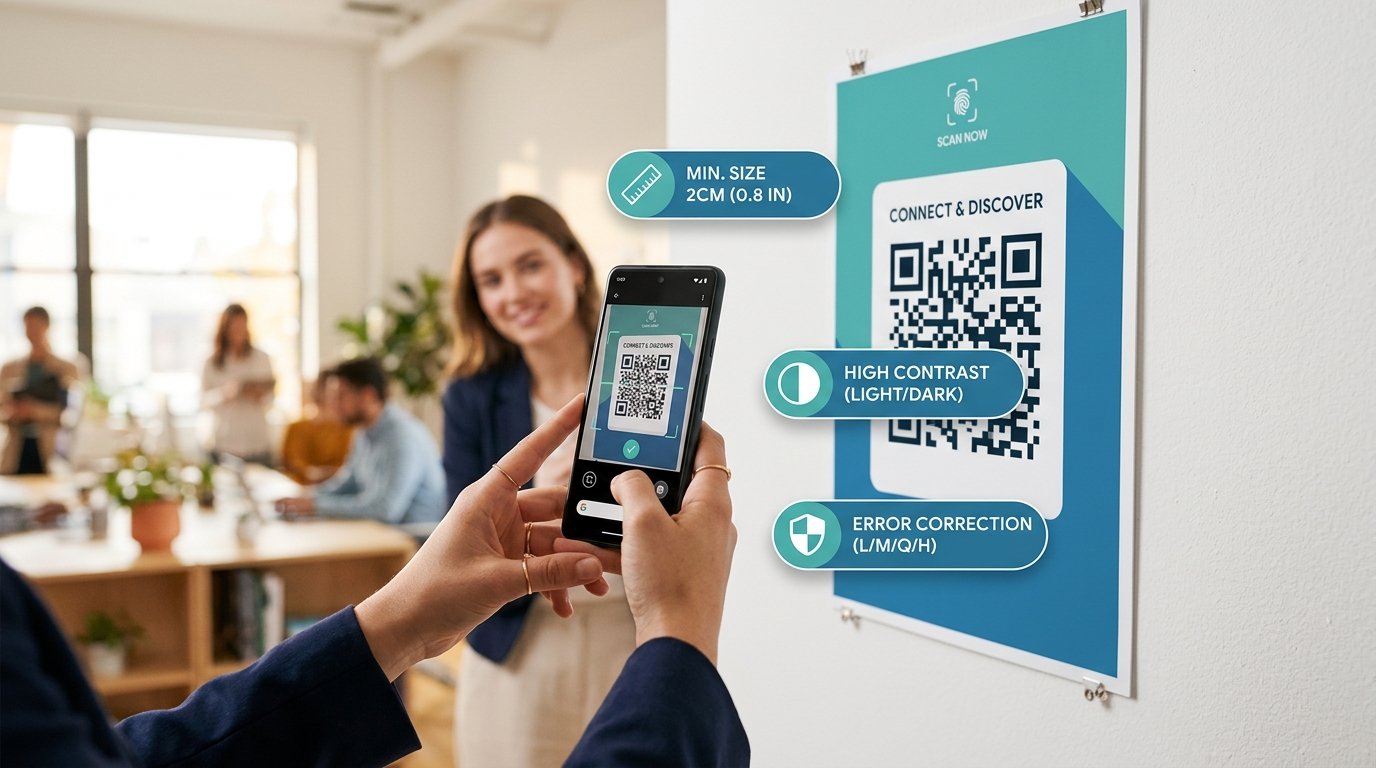
Person scanning a QR code poster in a modern office, with tip badges showing minimum size 2cm, high contrast, and error correction
Advertisement
📏
2 × 2 cm
Minimum print size for reliable scanning at arm's length
4 Modules
Required quiet zone border on all 4 sides (ISO 18004)
🛡️
7–30%
Data recovery range across error correction levels L to H
📐
10 : 1
Scanning distance to code size ratio rule for large prints
📏 Print Size Reference

Recommended QR Code Sizes for Print

Never guess the right size. Use this reference table for every print format

Print Medium Recommended QR Size Minimum QR Size Max Scan Distance Recommended ECC
💼 Business Card (9×5cm) 2 × 2 cm 1.5 × 1.5 cm ~20 cm (close up) M or Q
📄 A4 Flyer 4 × 4 cm 2.5 × 2.5 cm ~40 cm M
📰 A3 Poster 6 × 6 cm 4 × 4 cm ~60 cm M or Q
🖼️ A2 Display Banner 10 × 10 cm 7 × 7 cm ~1 m Q
🪟 Shop Window / Roll-up 15 × 15 cm 10 × 10 cm ~1.5 m Q or H
🏙️ Outdoor Billboard 50 × 50 cm + 30 × 30 cm Up to 5 m H
📦 Product Label / Sticker 2.5 × 2.5 cm 2 × 2 cm ~25 cm M or Q
🥡 Packaging Box Side 3 × 3 cm 2 × 2 cm ~30 cm Q (dusty environments)

* All sizes assume standard contrast (black on white). Reduce by 20% if using colored QR codes with lower contrast ratios.

🎨 Color & Contrast

QR Code Color Rules

Color mistakes are the #1 reason printed QR codes fail to scan

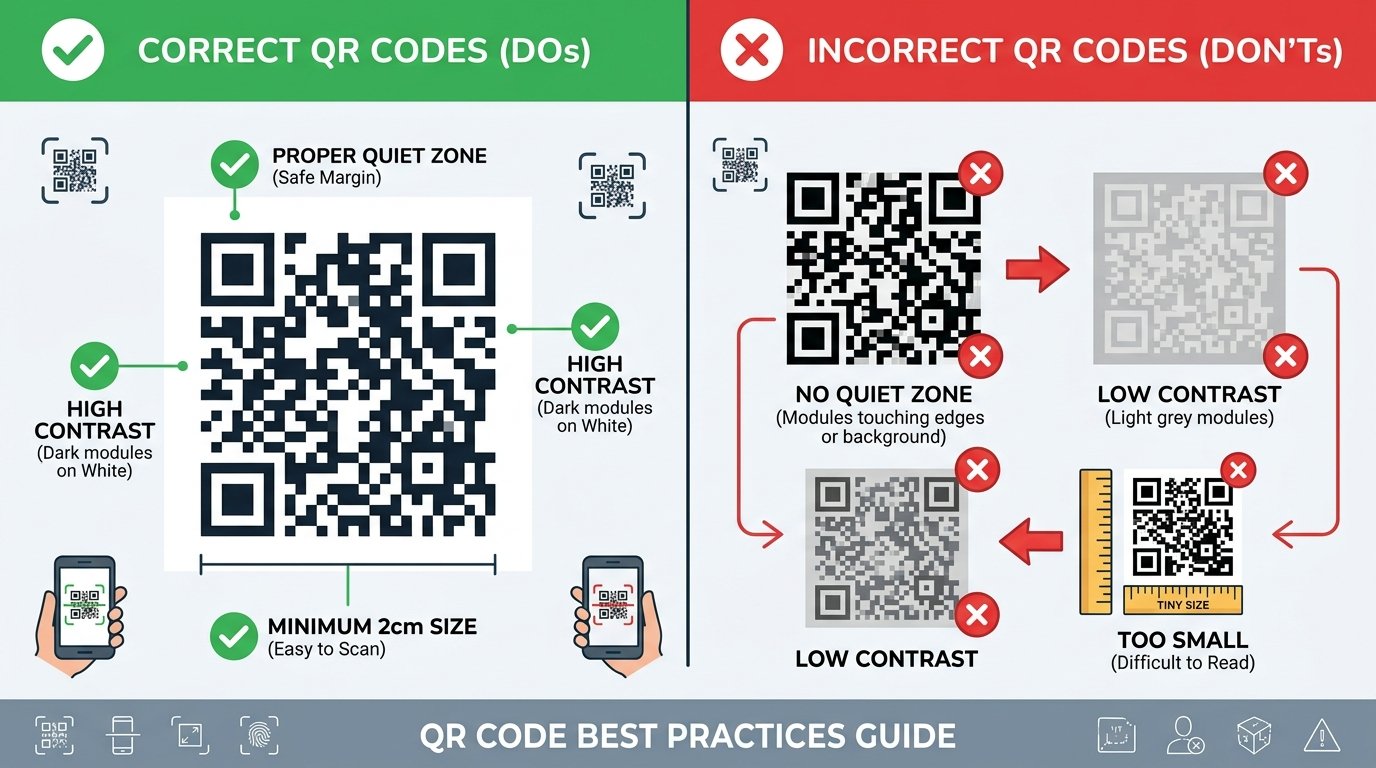
Visual comparison of correct QR codes (dark on white, proper quiet zone) vs incorrect QR codes (no quiet zone, low contrast, too small)

✅ DO: Color Best Practices

  • Use dark foreground on light background — black on white is always the safest choice
  • Maintain a minimum contrast ratio of 4:1 between QR modules and background
  • If using colors, ensure foreground is at least 4× darker than background
  • Keep the quiet zone (white border) free of any decorative elements
  • Use solid, flat colors — not gradients, textures, or patterns for the background
  • Test on multiple smartphones including older models with basic cameras

❌ DON'T: Common Color Mistakes

  • Never use light modules on a dark background (inverted QR) — most apps cannot read them
  • Avoid similar tones (e.g., dark blue on dark green) — scanners detect luminance contrast, not hue
  • Do not place QR codes on busy, patterned, or photographic backgrounds
  • Never use semi-transparent overlays on QR modules
  • Do not print on reflective or glossy surfaces without matte lamination
  • Avoid red foreground — some older QR scanner chips treat red as transparent
🛡️ Error Correction Levels

Choosing the Right Error Correction Level

Error correction uses Reed-Solomon mathematics to recover data from damaged modules. Higher levels = safer codes but slightly denser patterns.

L

Level L — Low

7% recovery

The most compact QR code. Produces the fewest modules and is the easiest for all cameras to scan when conditions are perfect. No logo embed possible.

Digital screens only
M

Level M — Medium

15% recovery

The default standard for most printed materials. Recovers from minor smudges, light scratches, and minor printing imperfections. Safe for flyers and packaging.

General print use
Q

Level Q — Quartile

25% recovery

Recommended for codes exposed to outdoor environments, humidity, UV light, and partial obstruction. Used in industrial and warehouse settings.

Outdoor & industrial
H

Level H — High

30% recovery

The highest protection level. Required when embedding a logo — the logo covers data modules, and Level H ensures the code remains scannable despite the obstruction.

Logo embed & rugged
Advertisement
✅ Pre-Print Verification

QR Code Testing Checklist

Run through this checklist before printing any QR code. Click each item to mark as done.

0/8

📐 The 10:1 Scanning Distance Rule

Max Scan Distance = 10 × QR Code Width

A QR code that is 5 cm wide can be reliably scanned from up to 50 cm away. A billboard QR code that is 50 cm wide can be scanned from up to 5 meters away. Use this formula to calculate the correct QR code size for your display's expected viewing distance. Always print larger than the minimum when in doubt — a larger QR code is always better.

📖 Real-World Examples

QR Code Case Studies

Learn from concrete examples of well-configured real-world QR code deployments

🍽️

Case Study 1: Restaurant Tabletop Menu QR Code

A mid-range restaurant replacing paper menus with scannable QR codes on table tent cards

QR Type
URL (Dynamic)
Print Size
4 × 4 cm
ECC Level
Q (Quartile)
Color Scheme
Navy on White
Why these choices? Restaurant table tents experience frequent handling, spills, and grease — Level Q's 25% recovery tolerance keeps codes scannable even when lightly soiled. A 4×4 cm size ensures easy scanning at the typical 25–35 cm distance from a seated diner. Navy-on-white was chosen to match brand colors while maintaining high contrast. A URL type allows updating the menu without reprinting QR codes.
🎟️

Case Study 2: Concert Event Ticket Validation QR Code

A venue using QR codes on printed tickets for rapid entry scanning at the gate

QR Type
Text (Ticket ID)
Print Size
3 × 3 cm
ECC Level
M (Medium)
Color Scheme
Black on White
Why these choices? Printed tickets stay in pockets and wallets — Level M handles the typical creases and light wear of a paper ticket. Black on white provides maximum contrast for fast scanning under both indoor and outdoor lighting, even with basic barcode scanners at the gate. The QR encodes a short alphanumeric ticket ID rather than a full URL, keeping the code compact for faster decode speed.
📦

Case Study 3: FMCG Product Packaging Label

A consumer goods company embedding QR codes on product labels that link to ingredient information and warranty registration

QR Type
URL (with logo)
Print Size
2.5 × 2.5 cm
ECC Level
H (High)
Color Scheme
Brand Blue on White
Why these choices? The brand wanted to embed their logo in the center of the QR code. This physically covers approximately 20-25% of data modules, making Level H essential — its 30% recovery tolerance accommodates the logo with margin to spare. Brand blue (#1e3a5f) was chosen after contrast testing confirmed a 7.5:1 contrast ratio against the white label. The 2.5 cm size balances aesthetics with reliable scanning from typical retail distances.

Create Your Custom QR Code Now

Use our free online QR Studio to generate color-customized, logo-embedded QR codes with the right error correction level for your use case.

Open QR Studio →
Free download onGoogle Play